Which software tests exist and which ones does my digital product need?

4. September 2026 - from Marc Loup
14 min read

Professional software testing involves much more than simply trying out a finished app right before its launch. When it comes to digital products, the question "does it work?" cannot be answered with a simple yes or no. An application can execute all intended features correctly and yet remain slow or difficult to operate, expose security vulnerabilities, fail on specific devices, or crash under heavy traffic.
Good software quality encompasses various aspects, and whether software "works" depends on what you are looking for. Accordingly, there are different methods and approaches to testing it.

In this blog post, we highlight the various test methodologies, how they fit into the bigger picture, and how to decide which testing approach is the right one for a specific product at any given time.

The different dimensions of software testing

Ideally, software testing accompanies the development of a digital product from day one. It involves more than just checking whether individual features have been implemented correctly. Depending on the product and its requirements, various quality characteristics may be critical. These include, for example, stability, performance, security, user-friendliness, and accessibility.

To classify the various tests effectively, it is helpful to make a basic distinction between two dimensions. This framework was established by the ISTQB, the world’s leading certification body for software testing, in its official glossary

  • Test levels describe where in the development process, or at what level, testing takes place: this can range from a single line of code to the entire system.

  • Test types describe what is being tested, that is, which quality attribute is the focus, such as stability, performance, or security. 

A type of test can be used at different testing levels. For example, functionality can be tested both at the level of an individual component and across a complete end-to-end user workflow.

In short, these two dimensions answer two distinct questions: On which level are we testing, and which quality characteristic do we want to examine?

Which software tests exist and how are they categorized?

Test levels: On which level are we testing? 

Testing begins small at the lowest level: with individual units of code. From there, it expands step-by-step to encompass the entire system. This structured approach is effective because, as a rule, the earlier errors are detected, the easier and faster they are to fix.

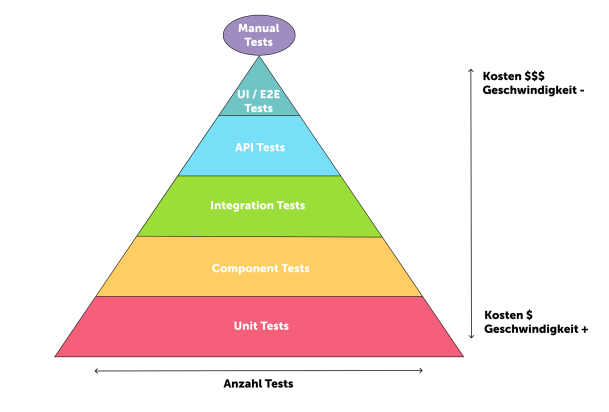
A helpful model for categorizing the various testing phases is the Testing Pyramid. It illustrates the testing phases and shows at a glance how tests should ideally be distributed and why.

Test pyramid with various test levels
The Testing Pyramid illustrates the different levels of testing alongside their volume, cost, and execution time. The concept behind this pyramid was developed by Mike Cohn and is described in more detail in one of his books.

Unit Testing
Unit tests examine individual, isolated units of source code and ensure that they function internally as intended. 

A typical example: In an online store, a product can be added to the shopping cart. A unit test test doesn't check whether the button is clickable or if the page layout looks correct. Instead, it verifies the underlying logic: Was the item added correctly? Is the quantity accurate? Is the total price calculated and saved properly? This business logic is tested in isolation, independent of the rest of the application.

The goal is to pinpoint bugs as early as possible: If a unit test fails, the affected code section can be identified immediately. Unit tests are written by developers, typically run automatically, and accompany development from the very start.

Component Testing
Once individual units have been tested, larger, self-contained components of a system are tested, such as an entire module or service. Component tests evaluate a component’s behavior as independently as possible from other parts of the system. Dependencies on other parts of the system are not taken into account.

Returning to our shopping cart example, where a product is added to the cart: A component test does not check the business logic behind it, but rather whether the component behaves correctly: Does the "Add to Cart" button disable once the product is already in the cart? Does a success message appear after clicking? Does the component display a loading state while the request is processing? This UI behavior is tested in isolation.

Integration Testing
Integration testing verifies whether interdependent components interact correctly with one another: whether data is passed correctly, if logic works together, and whether the system as a whole behaves as expected.

The shopping cart example allows you to verify not only whether an order is processed correctly within a single component, but also whether the order is actually saved correctly in the database. This uncovers bugs that remain hidden during isolated unit or component tests, where individual parts work on their own but fail when integrated.

API Testing
API tests are sometimes part of integration tests, but they focus on communication between defined interfaces. They verify that APIs return the correct data, respond correctly to requests, and remain stable under various conditions, regardless of what is happening at the user interface.

Example: When a product is added to the cart, an API test checks the backend interface: Does the endpoint return the expected data payload and status codes? Does the API react appropriately if an item is out of stock? This communication can be tested independently of the front end using tools like Postman or custom scripts.

End-to-End Testing
End-to-end (E2E) tests simulate complete workflows from the perspective of all users interacting with the software. Multiple user stories are tested in sequence to verify the interplay of the entire system and ensure data flows correctly across system boundaries. These tests are typically executed toward the end of a development cycle.

Our shopping cart example now becomes a complete workflow: Searching for a product, adding it to the cart, completing checkout, and receiving an order confirmation all touch the user interface (UI) used by the end customer. But E2E testing goes further: for example, it also verifies whether the ERP system generates the correct picking list for warehouse staff. An end-to-end test checks whether processes function as intended from start to finish.

Close-up of a person holding a smartphone in both hands and using an app. The turquoise screen shows a grid with covered squares and uncovered icons, including a strawberry and a rattle.

Types of tests: What is being tested?

While test levels describe where in the application testing occurs, test types define which quality characteristics are in focus. A single test type can be applied across multiple test levels simultaneously: regression tests, for example, run on both the unit and system levels. Which test types are relevant depends heavily on the specific product and its requirements.

The following sections describe the different types of tests, what they focus on, and which tests fall into each category.

Functionality, stability, and reliability 

These tests ensure that the app runs stably on all relevant devices, that changes do not break existing features, and that the installation process goes smoothly.

Smoke Testing
Smoke tests are quick, basic checks performed at the beginning of each test cycle: Is the build stable enough to begin comprehensive testing? They identify critical issues early on, before time is invested in more extensive testing. 

Functional Testing
Functional testing verifies whether every feature of an application behaves according to the defined requirements and acceptance criteria. Inputs are provided, workflows are executed, and actual results are compared against the expected outcomes. The goal is simple: Verify that the software does what it is supposed to do.

Regression Testing
When something new is built, existing features can break - sometimes without anyone noticing. Regression tests act as a continuous safety net, ensuring that previously working features continue to run flawlessly after code changes.

Compatibility Testing
Compatibility testing verifies whether an application functions correctly on different devices, operating systems, platform versions, or browsers, and how it behaves on different screen sizes and resolutions. Before tests can be planned effectively, it must therefore be clear on which devices, platforms, and browsers the application is intended to run.

Installation Testing
A user’s first interaction with an app begins with the installation. If this goes wrong, the first impression is rarely positive. Installation testing verifies whether software can be installed correctly on all target systems and whether updates and uninstallations work smoothly. Update testing deserves special attention: particularly with native apps, new versions may involve database migrations or changes to data structures. If this goes wrong, users could, in the worst-case scenario, lose their data.

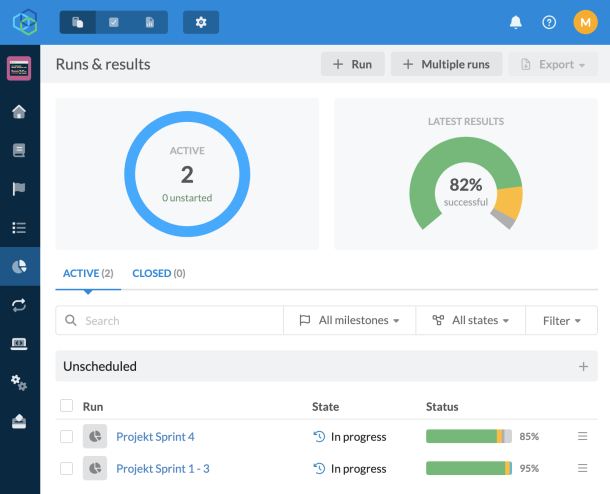
Screenshot from the Testmo testing tool
Excerpt from the "Testmo" testing tool we use

Performance and security

A functioning application must remain high-performing and secure under realistic conditions. The following types of tests are designed to assess how robust and secure a piece of software or a component of software is. 

Load and Stress Tests
Load tests simulate a defined volume of concurrent users, for example, 1,000 people accessing specific features simultaneously. This reveals how the system reacts under elevated traffic and whether it remains stable during peak times.

Stress tests go one step further: the system is pushed to its breaking point until it fails. The goal is not only to identify the maximum load capacity, but also to observe how the system behaves after a crash and whether it recovers automatically.

Security Testing
Security tests check applications and systems for vulnerabilities that could be exploited by attackers. These include vulnerability scans, security audits, and penetration tests. A penetration test (or “pen test” for short) is a controlled attack on an application’s security: Experts, often assisted by AI, deliberately attempt to uncover vulnerabilities in an application, API, or infrastructure before real attackers do.

User experience and accessibility

A digital product can be technically flawless and still fail if users cannot understand it or operate it efficiently. The following test types assess how accessible and user-friendly a software solution is. This category is vital for ensuring software is not only used, but loved.

Usability Testing
Usability tests measure how effective, efficient, and satisfying an application is to use. Real users perform defined tasks while observers note where they get stuck. Heuristic evaluations conducted with UX experts are particularly useful in early stages of development. Identifying usability issues early on saves costs, because adjustments are easier and less expensive at this stage than after launch. In many cases, they are absolutely crucial to the success of an application. 

Accessibility Testing
Accessibility Testing evaluates the digital accessibility of an application: How easily can people with visual impairments, motor limitations, or other disabilities navigate the software? Testing includes using assistive technologies such as screen readers, with the Web Content Accessibility Guidelines (WCAG) serving as the reference standard. Accessibility is not only an ethical consideration but increasingly a legal requirement. And improving accessibility enhances the overall user experience for everyone.

To learn more about accessibility from the perspective of a visually impaired user, check out our blog post: “Without Light on the Bright Web—Why Accessibility Is Important and What to Keep in Mind".
To dive deeper into testing accessibility, read our blog post “Accessibility in Digital Products from a Software Tester’s Perspective".

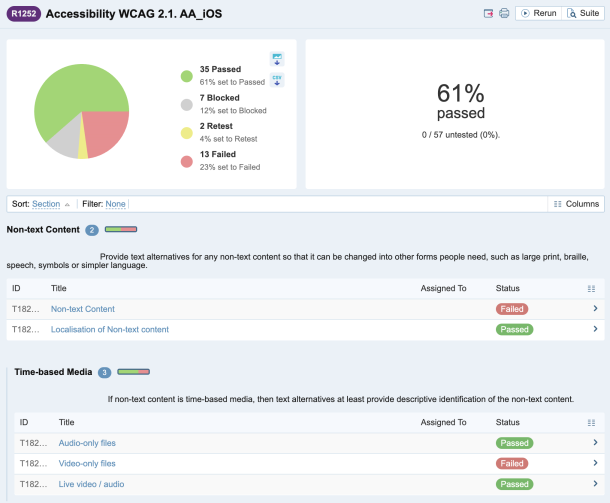
Screenshot from the Testrail testing tool
Screenshot of accessibility tests from the “Testrail” testing tool

Specialized tests for specific requirements

Some projects require testing that goes beyond standard methods because the conditions of use are unique, the target audience has specific requirements, or the system must be tested for unexpected behavior. For this reason, additional testing methods may be useful. 

Interruption Testing
Crucial for mobile apps, interruption testing evaluates how an application behaves when its user flow is abruptly disrupted. Typical scenarios include incoming calls or notifications, switching apps, locking the screen, changing networks, or a sudden battery drain. The goal is to ensure the app resumes smoothly after the interruption without losing data or exhibiting buggy behavior.

Chaos Testing
Unconventional yet highly effective, chaos testing simulates random, chaotic user input, as if someone were tapping, scrolling, and swiping at random. This method uncovers stability issues and crashes that often go undetected in structured tests. It complements targeted tests in particular by helping to uncover edge cases: errors or crashes that only occur in exceptional circumstances. 

In-the-Wild Testing
In-the-wild testing involves testing applications under real-world operational conditions. Instead of testing in an office under controlled lab conditions, the app is tested where it’s actually used: outdoors, on the go, and in the real-world environment of the target audience. For a sports app, for example, this means actually participating in sports. This reveals problems that would hardly have surfaced in a controlled testing environment. Of course, there is a close connection here with usability testing and user research, because the goal is to identify everyday usage patterns and the resulting benefits or problems. 

This categorization and these explanations are by no means exhaustive. Software testing, along with software development, is constantly evolving. Our Quality Assurance & Testing team stays on top of things!

What tests does my digital product need? 

After looking at all these testing methods, one might get the impression that the more testing is done, the better. But it's not that simple.

A small web application requires a different testing strategy than a security-critical platform handling thousands of concurrent users. Therefore, the key is not to run as many different tests as possible, but to cover the risks relevant to your specific product with an appropriate level of effort.

Requirements, risks, and context determine the test strategy

Which tests are appropriate depends on various factors. These include, in particular, the functional and non-functional requirements, the product’s risks, the context of use, and the target audience. The stage of development, project size, technical architecture, and available budget also play a role.

For an application that processes large amounts of sensitive data, security testing takes on a much higher priority than for a straightforward informational website. If high traffic volumes are expected, load and performance testing become more important. Meanwhile, a mobile application primarily used on the go, places different demands a completely different testing strategy than a desktop application built for a fixed workstation.

Effective test planning focuses on areas where errors would have the greatest impact or are most likely to occur.

Test design as a foundation

The choice of testing methods should not be made on the spot. Systematic test planning clarifies, among other things:

  • What should be tested?

  • What requirements must be met?

  • Where are the biggest risks?

  • Which devices, platforms, and usage scenarios need to be taken into account?

  • Which tests will be automated, and which will be performed manually?

  • And what level of testing is reasonable given the scope of the project?

This results in a test plan that specifies which types and levels of testing will be used, how test cases are derived from requirements and acceptance criteria, and when each test will take place during the course of the project.

This planning process is not a one-time event. Requirements change, products evolve, and new risks may arise. Accordingly, the testing approach is continuously reviewed and adjusted throughout the project.

This way, software testing becomes a part of continuous quality assurance throughout the development process, rather than a checkpoint just before release.

Image of a rack with smartphones and tablets. The rack is labelled "Kepp Bugs out of Production"

What do we automate, and what do we test manually?

An important part of test design is determining which tests to automate and which to execute manually. Not every test needs to be performed manually - and not every test should be automated.

Recurring and clearly reproducible tests are particularly well-suited for automation. Unit, API, and integration tests, in particular, can be run frequently and provide rapid feedback. This allows errors to be detected early and reduces the effort required for manual testing.

Other quality aspects, on the other hand, require human judgment or are difficult to automate. Manual testing therefore remains important, particularly for exploratory testing, usability testing, or very specific usage scenarios.

The testing pyramid helps strike a sensible balance: many quick and stable tests at the lower levels and targeted, more comprehensive tests at higher levels.

Conclusion: Don't test as much as possible, but test what matters

Professional software testing isn't about throwing every available testing method at a project. What matters is building the right combination: one that is tailored to the product, its requirements and risks, and the current phase of development.

Test levels provide clarity on where testing takes place, while test types sharpen the focus on which quality characteristics are being evaluated. A well-thought-out test plan brings both perspectives together and determines where and when each test will provide the greatest value for your digital product.

For each project, our Quality Assurance team evaluates which tests are appropriate, plans them systematically, and documents the results transparently. We offer testing both as an integrated part of our development projects and as a standalone service for existing digital products, including consulting on the development of a suitable testing strategy.

Reach out to us if you need expert support with software testing!

This blog post was created in collaboration with Martin Mattli, Head of Operations & Quality Management, and brings together the experiences and perspectives of our entire quality assurance team.

0:00
0:00